Tracking and automation
Tracking and Automating Your Adult Traffic Buys
Connect a tracker, pass the source ID on every click and return conversions with an S2S postback before your first campaign spends a cent. That loop ties each bought click to its site, creative, cost and outcome. Without it, every decision after launch is a guess.
Automation is the second half. Once the tracker shows which sources earn, rules inside the ad network act on those findings around the clock. The examples use AdsCompass, whose integrations and rule settings are documented, but the logic carries over to any adult traffic source.
Connect a Tracker Before the First Dollar
Tracking from click one turns the first budget into data. That opening deposit is a learning budget: you pay to find out which sites, creatives and hours convert. Spend it untracked and you get a blended total of clicks and spend, with no way to say which source produced which sale.
Fifty dollars buys 50,000 clicks at $0.001 each, spread across many sites. Without a source ID on each, they collapse into one dashboard line. With it, they become sites ranked by cost per conversion, and the bottom of that list is your first blacklist.
Network reports alone fall short. They show clicks and spend per site, but the network never learns what happened on your offer unless you send that back. The tracker records each click and later matches the conversion to it. I would not launch even a minimum-deposit test without one.
Trackers That Connect to AdsCompass
Six trackers have a ready path. CPV Lab and CPV One have documented step-by-step integration, so you follow published instructions. Keitaro, Binom, Voluum and RedTrack connect through S2S postback templates: add AdsCompass as a traffic source, map the macros, place the postback URL. Allow about an hour for any of those four.
Keep the tracker you already use, because switching splits your history in two. Starting from zero, I would take the CPV Lab or CPV One route, since written steps leave less room for a mismapped macro.
Register before funding anything. Signing up at adscompass.com costs nothing, the first top-up to buy adult traffic is $50, and the tracker connection is easiest to check while nothing is spending. If a postback refuses to fire, ask your personal manager or the round-the-clock Telegram support chat.
Macros Worth Passing
Source ID is the one macro you cannot skip. It names the site behind each click, and per-site bids, blacklists, whitelists and placement campaigns all depend on it. AdsCompass supports the seven macros below, so map every one your tracker has a slot for.
| Macro | What it tells you |
|---|---|
| Source ID | Which site sent the click |
| Click ID | Unique key the postback returns |
| Campaign ID | Which campaign bought the click |
| Creative ID | Which ad the visitor clicked |
| Price | What that click cost you |
| IP | Visitor address, repeat visits |
| User agent | Device, OS and browser version |
Price turns click counts into ROI. With cost passed on every click, the tracker calculates ROI per source without manual cost imports. Creative ID does the same for ads, since two creatives with similar click-through can convert very differently.
IP and user agent are your quality check. AdsCompass vets every site before it joins, blocks bot traffic automatically and can exclude proxy and IPv6 traffic before the impression is bought. Your tracker shows what still slips through: one IP clicking repeatedly, an ISP that never converts. Each can go on a blacklist by IP, ISP or source ID.
How an S2S Postback Works
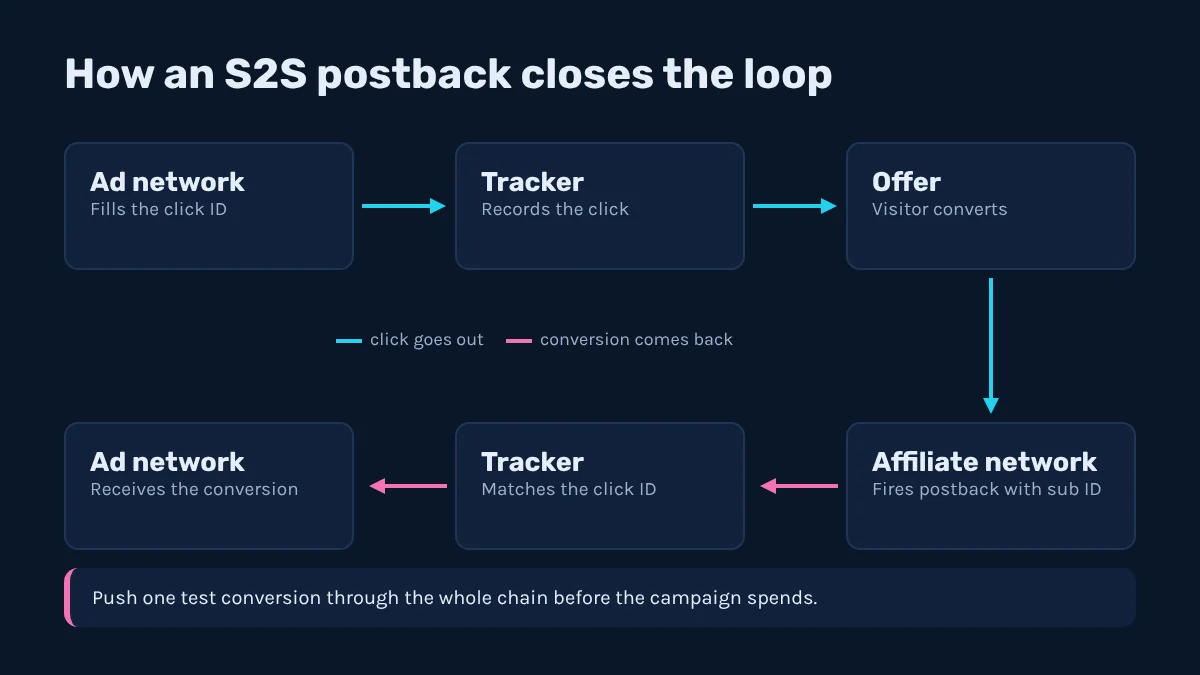
Server-to-server calls carry each conversion back to the click that caused it, matched by click ID. Nothing runs in the visitor's browser, so ad blockers and cleared cookies cannot break the chain. The round trip:
- Click. AdsCompass fills the click ID macro in your tracker link with a unique value.
- Record. The tracker stores that click ID with the other macros, then redirects to your lander or offer.
- Hand off. The tracker passes its own click reference to the affiliate network, usually in a sub ID.
- Convert. The visitor signs up or pays, and the affiliate network fires a postback to your tracker with that sub ID.
- Return. The tracker matches the conversion and calls the AdsCompass postback URL with the original click ID.
The click ID must survive every hop. A missing macro in the tracker link or a dropped sub ID stops the conversion halfway, and the traffic source never hears about it. Before launch, push one test conversion through the whole chain and confirm both ends logged it.
Rules That Run Without You
Campaign rules carry out what the tracker tells you, every hour, without you watching. Set them at launch and tune them as data comes in.
Source ID lists with bid rules
Upload source ID lists before launch and attach a bid rule to each. AdsCompass calls this source ID bidding, or micro bidding: each site gets its own price instead of one network-wide bid. Three lists cover most needs: proven sources at a raised bid, untested ones at base bid, and a blacklist. Once the proven list grows, move it into a placement campaign and keep run-of-network running separately to find new sources.
Daily and hourly budgets
Hourly budgets stop one bad hour from eating the day, which a daily cap alone cannot do. Even spend spreads the budget across 24 hours, while fast spend buys as quickly as the auction allows until the cap hits. Test on even spend so every hour produces data, and save fast spend for proven sources.
Dayparting with timezone
Set the timezone before the schedule. AdsCompass lets you pick the dayparting timezone, so match it to the one your tracker reports in. If they differ, your hour-of-day report and the schedule disagree, and you end up cutting hours that convert. For single-GEO campaigns I set both to local time.
Frequency cap per unique IP
Frequency capping limits how often one unique IP sees your ad per day, so you stop paying again for a visitor who already ignored the offer. Check how often IPs repeat in your tracker before picking a number, and go easy on carrier traffic, where many users can share one IP.
Retargeting With the SST Pixel
Retargeting on AdsCompass runs through the Audiences section, fed by the SST Pixel. Place the pixel on your pages, set auto-collection rules that decide who joins an audience, and set a storage period for how long each user stays in it. Then target that audience from a separate campaign.
Build audiences by funnel stage. Lander visitors who never clicked through and offer visitors who did not convert need different messages, and pooling them wastes the one edge retargeting has.
Match the storage period to the offer's decision cycle: short for one-click offers, longer for paid memberships and multi-step signups. Track retargeting as its own campaign too, or its conversions inflate the cold campaign's source numbers.
Tracking and Automation FAQ
Can you buy adult traffic without a tracker?
Yes, but you are buying blind. Network reports show clicks and spend per site, yet without a tracker and a postback you cannot tie conversions to source IDs or set per-site bids with confidence. Connect one before the first deposit starts spending.
Which macro matters most?
Source ID matters most. It identifies the site behind every click, and bid lists, blacklists and placement campaigns all depend on it. Click ID is a close second, because without it the postback has nothing to match.
How long does tracker setup take?
About an hour for Keitaro, Binom, Voluum or RedTrack through the S2S postback templates. CPV Lab and CPV One follow documented step-by-step integration instead. Either way, push one test conversion through the full chain before you spend.